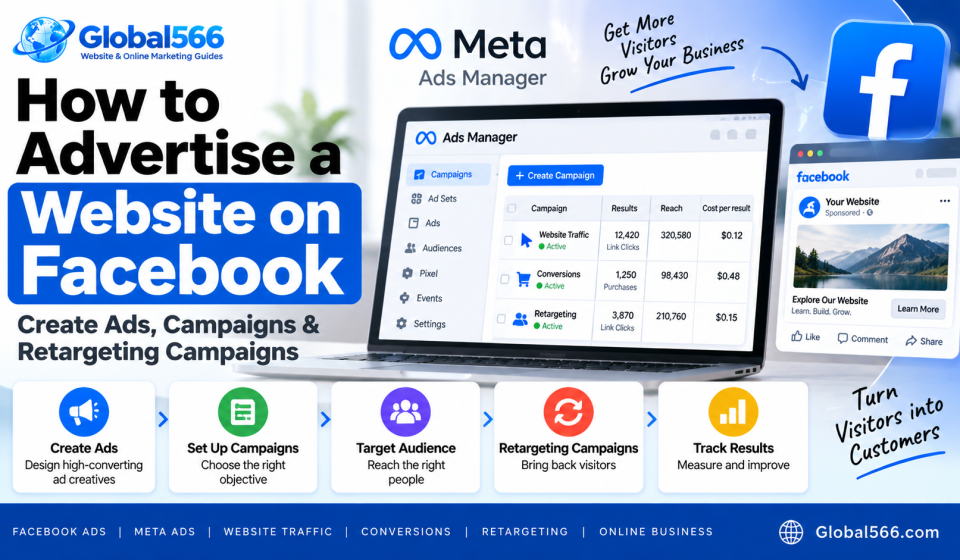

Facebook Ads can send people directly to your website, product page, landing page, or contact form.
You create the campaign in Meta Ads Manager, choose who you want to reach, set your budget, create the ad, and send people to a specific page on your website.
If you already have traffic coming to your site, you can also create retargeting campaigns for people who visited your website before.
What you need before creating a Facebook ad
You’ll need a few things ready:
- A Facebook Page
- A Meta Business account
- A Meta Ads account
- A website or landing page
- A payment method for your ad account
For website advertising, I’d also install the Meta Pixel before spending money.
The Pixel sends website activity back to Meta so you can track actions such as page views, leads, add-to-cart events, and purchases.
How to create a Facebook Ads campaign
Open Meta Ads Manager.
Click Create to start a new campaign.
Meta will ask you to choose a campaign objective.
The options you see can change as Meta updates Ads Manager, but common objectives include:
- Awareness
- Traffic
- Engagement
- Leads
- Sales
Choose the objective that matches what you want people to do.
For example, if you’re selling a product through your website, Sales makes sense.
If you’re trying to send visitors to a blog post or landing page, Traffic can be a better fit.
Don’t pick an objective just because the name sounds impressive. Tell Meta what you actually want.
Set your campaign budget
Enter your budget at the campaign level or ad set level, depending on the setup Meta gives you.
For example:
Daily budget: ₹500
That gives you a starting budget of around ₹15,000 over 30 days if the daily spend stays at ₹500.
Start with an amount you can afford to test.
You can increase the budget after you have enough results to judge the campaign.
Create your Facebook ad set
The ad set controls who sees your ads, where they see them, and when they see them.
Choose your audience.
You can target people using things such as:
- Location
- Age
- Gender
- Interests
- Custom audiences
- Lookalike audiences
For example, suppose you sell men’s running shoes in India.
You could target people in India within a suitable age group and build your audience around your customer profile.
Keep your audience connected to your product.
If you sell ₹4,000 running shoes and target everyone from teenagers to retirees across every possible interest, Meta has a lot of people to sort through.
Choose where your ads appear
Meta can show ads across placements such as Facebook, Instagram, Messenger, and other Meta surfaces.
You can use Advantage+ placements if it’s available in your account.
You can also choose placements manually.
If you’re starting out, I’d test the placements that fit your creative and audience instead of creating a giant list of exclusions before you’ve collected any results.
Choose the website destination
Enter the URL where you want people to land.
For example:
https://example.com/men-running-shoes
Send people to the page that matches the ad.
If your ad talks about men’s running shoes, sending visitors to your homepage makes them search for the product again. That’s wasted effort.
How to create a Facebook ad
Go to the Ad section inside your campaign.
Select the Facebook Page and Instagram account you want to use.
Then choose your ad format.
Depending on your account and campaign setup, you can use formats such as:
- Single image
- Video
- Carousel
Upload your image or video.
Then write the primary text.
For example:
Running shoes for daily training.

Lightweight design, cushioned sole, sizes 7 to 12.

Shop online today.
Add a headline and choose a call-to-action button such as Shop Now or Learn More.
Then enter your website URL.
Preview the ad before publishing it.
Check how it looks on mobile. Most of your Facebook and Instagram traffic will likely come through phones, so don’t design the ad around a 27-inch monitor.
How to advertise a website on Facebook
Your ad needs a clear connection between the message and the landing page.
Suppose you’re advertising a blog post about Shopify.
Your ad could say:
Building a Shopify store?

Here's a step-by-step guide covering products, payments, shipping, domains, and launch.

Read the guide.
The link should take visitors directly to that article.
For an ecommerce website, send people to the relevant product or category page.
For a service business, send them to a page where they can understand the service and contact you.
Use UTM parameters to track Facebook traffic
You can add UTM parameters to your website URL so Google Analytics can identify the campaign.
For example:
https://example.com/product?utm_source=facebook&utm_medium=paid&utm_campaign=running_shoes
You can then see campaign traffic inside Google Analytics.
Keep your UTM naming consistent.
If one campaign uses facebook, another uses Facebook, and another uses fb, your reports become unnecessarily messy.
How to create a Facebook retargeting campaign
Retargeting lets you advertise to people who already interacted with your website.
For example, someone visits your product page but leaves without buying.
You can create an audience containing website visitors and show them another ad later.
First, make sure your Meta Pixel is installed and receiving events.
Then open:
Meta Ads Manager → Audiences
Create a Custom Audience.
Choose Website as the source.
Select the Pixel connected to your website.
You can then create an audience based on website activity.
For example:
All website visitors
Or you can create a more specific audience, such as people who visited a particular product page.
You can also choose a retention period, depending on the audience options Meta provides.
Create a retargeting ad
Create a new campaign in Meta Ads Manager.
Choose the objective that matches your goal, such as Sales for an ecommerce store.
At the ad set level, select your website visitor Custom Audience.
Then create the ad.
For example:
Still looking at our running shoes?

Your size might still be available.

Shop the collection today.
Send the visitor back to the product or category page they were looking at.
You can also create different audiences for different actions.
For example:
Website visitors
Product viewers
Add-to-cart visitors
Past customers
Each group can receive a different message.
Exclude people who already purchased
If you’re advertising a product to people who haven’t bought it, exclude recent purchasers from that audience.
Create a customer or purchase-based Custom Audience and use it as an exclusion where appropriate.
This prevents you from repeatedly showing a “Buy now” ad to someone who bought the product yesterday.
Your customers will appreciate the basic courtesy.
Track Facebook ad results
Don’t judge a campaign only by likes or comments.
For website advertising, look at metrics connected to your actual goal.
Useful numbers include:
- Link clicks
- Landing page views
- Cost per click
- Leads
- Purchases
- Cost per lead
- Cost per purchase
- Return on ad spend
For example, suppose you spend:
₹10,000 on Facebook Ads
And you generate:
50 purchases
₹40,000 revenue
Your revenue from the campaign is ₹40,000, while your ad spend is ₹10,000.
That’s a 4x return on ad spend before accounting for product costs, shipping, taxes, refunds, and other business expenses.
Test your website before running ads
Open the landing page yourself.
Check the page on your phone.
Click the buttons.
Test the contact form.
Add a product to the cart if you’re running an ecommerce store.
Go through checkout.
Check that the Meta Pixel records the relevant events.
And make sure your page loads properly before you send paid traffic to it.
There’s little point spending ₹500 on ads if your checkout button has decided to take the afternoon off.
Start with one clear campaign
You don’t need 20 campaigns on day 1.
Start with a clear offer, a relevant audience, a suitable landing page, and a budget you can actually afford.
Give the campaign enough time and spend to collect useful results.
Then look at the numbers and decide what deserves more budget, what needs a new ad, and what should be paused.